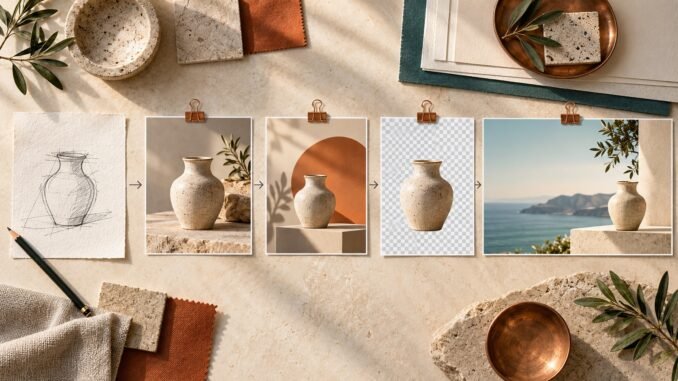
The most interesting change in ChatGPT's new image creator is not that it can make prettier pictures. It is that image creation is becoming a repeatable workflow instead of a sequence of disconnected prompts.
OpenAI introduced ChatGPT Images 2.5 on 8 September 2026 with sharper detail, faster generation, more precise editing and better consistency across several rounds of changes. ChatGPT also gained practical controls around that model: Sketch, templates, image comments and shareable prompts.
For a creator or solo operator, the real opportunity is to use those controls to build a small visual system. One clear brief can become a website hero, product image, social crop, presentation visual or campaign variation without rebuilding the idea every time.
Information checked: 14 September 2026. This is a source-based practical guide, not a hands-on benchmark or performance test.
What is actually new in ChatGPT Images 2.5
OpenAI says Images 2.5 produces more natural lighting and richer textures, preserves subjects in reference images more reliably, and follows editing instructions better over multiple turns. The company reports generation latency up to 50% lower than Images 2.0, although actual waiting time can still vary with the complexity of a request.
The product changes matter as much as the model upgrade:
- Sketch lets you draw a rough visual guide and add written instructions. OpenAI's current help page describes Sketch as a mobile feature.
- Templates provide structured starting points for formats such as posters, logos and product photos. OpenAI notes that templates are not yet available in Work mode.
- Comments and targeted edits make it easier to point at a specific area or describe a focused correction.
- Prompt sharing lets another person reuse the idea with their own inputs.
- Flexible aspect ratios and transparent backgrounds make it more practical to prepare assets for different destinations.
ChatGPT Images is available across all ChatGPT tiers on web, iOS and Android, but individual limits and feature availability can vary. OpenAI says Images 2.5 is also available in ChatGPT Work and Codex.
These features do not eliminate creative judgment. They reduce the friction between an idea and a coherent set of usable assets.
The better mental model: a visual brief with controlled outputs
A weak workflow begins with “make me a nice image” and ends with several unrelated generations. A stronger workflow begins with a visual brief that separates what must remain stable from what may change.
Write six lines before generating anything:
- Job: What must the image help someone understand or do?
- Audience: Who is it for, and where will they see it?
- Focal point: What should the eye notice first?
- Visual rules: Which palette, materials, lighting and mood should remain consistent?
- Invariants: Which subject, product, composition or identifying details must not drift?
- Exclusions: Which text, logos, objects, claims or styles must not appear?
This brief is more valuable than a single clever prompt. It becomes a reusable production asset: a standard that can guide new formats, future revisions and another collaborator.
A five-stage workflow for creators and solo businesses
1. Use Sketch or a reference image to settle the structure
If spatial relationships matter, show them. A rough sketch can communicate where the subject, product and negative space belong faster than several paragraphs of directions. A reference photo can anchor a real product or subject.
Do not upload sensitive client material, private photographs or unreleased designs without checking whether the account and workspace are appropriate. For individual ChatGPT services, OpenAI says submitted content may be used to improve models when “Improve the model for everyone” is enabled; that setting can be changed under Data Controls. OpenAI says business products and the API do not train on inputs or outputs by default unless the organisation opts in.
2. Generate a master, not every channel version
Create one strong master image first. Confirm the focal point, composition, subject identity, lighting and overall visual language before asking for variations.
A master could be a wide product scene, a clean editorial illustration or a character in a defined environment. Save it once the core decisions are right. If later edits drift, return to that approved version rather than trying to repair a damaged chain indefinitely.
3. Make focused edits and repeat the invariants
Images 2.5 is designed to preserve more of an image while changing the requested detail, but “more reliable” does not mean perfect. OpenAI's help page warns that selected regions are not always precise and edits can extend beyond the highlighted area.
Ask for one meaningful change at a time:
> Replace only the background with a warm studio wall. Keep the product shape, label placement, camera angle, crop, shadows and colour unchanged.
After each edit, inspect edges, reflections, hands, faces, small text and repeated objects. The model can accelerate revision; it cannot sign off on accuracy for you.
4. Derive a small asset family
Once the master is approved, create only the formats the project needs. For example:
- a 16:9 website or article hero;
- a 4:5 feed image;
- a transparent-background product cutout; and
- a presentation or marketplace visual with deliberate negative space.
Treat each as a derivative, not a separate creative direction. Preserve the same focal subject, palette and mood while adapting the crop and supporting elements. This is where faster generation and multi-turn consistency can create time leverage: one approved concept supports several useful placements.
5. Save the brief, master and revision decisions
The long-term asset is not only the finished JPEG. Keep the visual brief, source references, approved master, prompts that produced useful changes, channel specifications and a simple rights-and-accuracy checklist.
That archive makes the next campaign faster. It also reduces dependence on a particular interface or model because the decisions that define the work remain yours.
Where the new image creator still needs human control
Better fidelity can create higher expectations, but it does not remove the familiar failure modes of generative images.
Check factual graphics against original data. Inspect product geometry and branding against the real item. Obtain permission for photographs and likenesses. Review whether an imitation of a living artist's style, a recognisable character or third-party intellectual property creates legal or ethical risk. Do not treat generated text as proofread copy.
OpenAI says supported generated images include C2PA metadata and SynthID watermarking as provenance signals. Those signals can help indicate origin, but OpenAI also cautions that provenance does not prove an image is accurate, unedited, legally owned or presented in the correct context. Maintain your own disclosure and approval process when the image could mislead an audience.
Costs also include more than a subscription. Iteration consumes time and usage allowance. High-volume production creates storage, naming, review and version-control work. A simpler photograph, diagram or existing template may still be the better choice when it communicates the idea clearly.
How this becomes a wealth machine
The wealth-creation link is not “generate images and sell them.” That framing ignores taste, differentiation, rights, distribution and customer value.
The durable advantage is a system that shortens the distance from idea to useful visual output. A consultant can make proposals more legible. A retailer can prepare controlled product variations. A creator can build a recognisable asset library. A small publication can turn one approved concept into consistent visuals across its owned channels.
That can create time wealth by reducing repeated setup. It can support financial wealth when stronger visual communication improves a real product, service or digital asset. But the value still comes from the problem solved, the audience reached and the judgment applied—not from the number of images generated.
Start with one recurring visual job this week. Write the six-line brief, create one master, derive two formats and record the changes that worked. If that process produces a genuinely useful result more than once, you have begun building a visual system rather than merely trying a new tool.
Sources
- OpenAI: Introducing ChatGPT Images 2.5
- OpenAI Help Center: Images in ChatGPT
- OpenAI Help Center: How your data is used to improve model performance
- OpenAI Help Center: Provenance signals in OpenAI-generated content
Disclosure: AI tools assisted with research, drafting and the original editorial illustration. The article was reviewed for accuracy, usefulness, originality and editorial judgment. No affiliate relationship or sponsorship influenced this article.
