Most AI-built tools do not fail because the first version was impossible to create. They fail because the builder stops at “it works.”
A working tool is only the beginning. To become a digital asset, it must solve a recognisable problem, earn trust, become discoverable and give people a reason to return or recommend it. Distribution is not something bolted on after launch. It is part of the product.
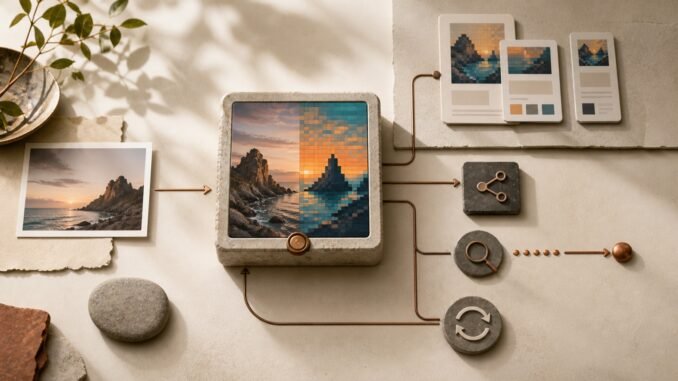
Pixel Press is a useful example. It turns JPG, PNG and WebP images into downloadable pixel art, with controls for aspect ratio, crop position, output resolution, pixel density and colour palette. The conversion happens locally in the browser, so the uploaded image does not leave the user’s device.
That is already a functional product. The more valuable question is how a small tool like this can attract an audience without paid advertising.
Start with a job, not a list of features
“Image-to-pixel-art converter” describes the software. It does not yet explain why someone should care.
Different users may hire the same tool for very different jobs:
- A creator wants a retro profile picture.
- A parent wants to turn a family photo into a craft reference.
- A game developer needs visual inspiration for a scene.
- A designer wants a deliberately limited colour palette.
- A privacy-conscious user wants to transform a personal image without uploading it to an unknown server.
The first distribution task is to choose a few of these jobs and demonstrate them clearly. A focused example page called “Turn a pet photo into pixel art” is more useful than a generic page repeating every control in the interface.
This also produces a stronger search strategy. Google’s SEO guidance recommends thinking about the different terms readers may use and creating unique, useful material rather than copying what already ranks. The objective is not to manufacture dozens of thin keyword pages. It is to make a small number of pages that help a real user complete a specific creative task.
Make the output carry the story
Visual tools have a natural distribution advantage: their output can become the marketing.
For Pixel Press, a simple before-and-after example explains the product faster than a paragraph of promotional copy. The original image establishes context; the converted version creates curiosity; and a short settings recipe makes the result reproducible.
A repeatable content unit could contain:
- the original image;
- the finished pixel-art version;
- the chosen crop format, pixel density and palette size;
- one sentence explaining the creative decision; and
- a direct link to try the same workflow.
One transformation can then support an article, an image post, a short demonstration and a gallery entry. That is leverage: the product creates the raw material for its own distribution.
Sharing should still respect the user. A mandatory watermark may spread the brand, but it also makes the downloaded asset less useful. A better design is an optional “Made with Pixel Press” badge, plus a convenient link or suggested caption after download. The clean export remains the default; attribution becomes an easy choice rather than a tax.
Build a discoverability layer around the tool
A naked widget is difficult for both people and search engines to understand. Surround the tool with enough context to answer five questions:
- Who is it for?
- What can they make?
- Which settings produce a good starting result?
- What happens to the uploaded image?
- What are the tool’s limitations?
Google says people-first content should leave visitors feeling that they have learned enough to achieve their goal. For a creative tool, that means publishing real examples, clear instructions and honest boundaries—not a long introduction designed to delay access to the converter.
High-quality example images also matter because visual search can become an entry point. Descriptive filenames, accurate alternative text and relevant surrounding copy help people and search engines understand what an image represents.
The local-processing promise deserves special prominence. “Your image never leaves this device” answers a real objection, particularly for portraits and family photographs. It should remain accurate as the product evolves. If a later feature sends an image to a server or third-party model, the privacy explanation must change with it.
Use communities as research, not a broadcast channel
Organic distribution often begins in communities, but dropping the same link everywhere is not a strategy.
A better approach is to enter with a useful artefact or question. Share a transformation, explain the settings and ask what would make the workflow more useful. Relevant communities might include pixel artists, indie game developers, retro-gaming fans, digital crafters, educators and creators experimenting with avatars.
The response is product research. If craft users repeatedly ask for a printable grid, that is evidence for a feature or tutorial. If game developers need fixed sprite dimensions, that suggests a different preset. If people hesitate because of image privacy, the browser-local design should become more visible.
Every community has its own promotion rules. Disclose that you built the tool, contribute something useful before asking for attention, and avoid pretending to be an unaffiliated user. Trust is a compounding asset; manufactured enthusiasm is a liability.
Small creators can be valuable partners here. Instead of sending a generic pitch, transform one of their public images—with permission where needed—and give them a polished before-and-after package. The proposition is concrete, and they can judge the output before deciding whether to share it.
Install a 30-day organic growth loop
The first month does not need a large campaign. It needs a disciplined learning loop.
Week 1: Clarify the promise
Choose three priority use cases. Improve the landing-page explanation, privacy language and examples around those jobs. Confirm that mobile upload, preview and PNG download work reliably.
Week 2: Publish proof
Create ten strong transformations across the three use cases. Publish two detailed recipes and several shorter before-and-after demonstrations. Keep the visual quality high enough that the result is worth saving even if the viewer never uses the tool.
Week 3: Find concentrated audiences
Share selected examples in a few relevant communities, following their rules. Contact a small number of niche creators with personalised examples. Record questions, objections and unexpected uses.
Week 4: Improve the loop
Turn the strongest response into a new preset, guide or challenge. Remove friction from sharing. Update weak titles or explanations based on actual search queries and user language.
Search Console’s Performance report can show impressions, clicks, click-through rate and the queries that surface a site. Those signals are more useful than checking rankings manually. Product metrics should go one step further: track upload starts, successful downloads, repeat visits and shared-link referrals. A visit is attention; a completed download is evidence that the tool delivered value.
Treat maintenance as part of the asset
Organic promotion compounds only while the product remains trustworthy.
That means testing browser compatibility, keeping privacy claims current, checking that downloads still work, fixing broken examples and reviewing which pages genuinely help users. It also means resisting features that create support work without improving the core transformation.
Pixel Press does not need to become a large creative suite to be useful. Its advantage may come from remaining fast, focused and easy to understand. A small tool with a clear promise, dependable output and a growing library of examples can become a durable digital asset.
The practical lesson applies beyond pixel art: build the smallest tool that completes a real job, then design a system in which useful outputs create stories, stories attract the right users, and user behaviour informs the next improvement.
Do not wait for distribution after the product is finished. Build distribution into what the product helps people make.
Sources
- Pixel Press: Image to Pixel Art Converter
- Google Search Central: Creating Helpful, Reliable, People-First Content
- Google Search Central: SEO Starter Guide
- Google Search Console Help: Performance Report
Disclosure: Pixel Press is a Wealth Machines project. This article was prepared with AI assistance and human editorial review. No affiliate links or paid placement are included.